What is a VPN? The basics explained
Mar 23, 2023
More and more businesses use IoT, the cloud, and other technologies. At the same time, network security is becoming more important, and more companies are adopting VPNs to build secure, stable networks. This article explains the basics of VPNs, including how they work and the different types, as well as how to connect over mobile networks.
What is a VPN?
On the open internet, there is always a risk that malicious users will read your information. To prevent this, organizations use leased lines, VPNs, and encryption.
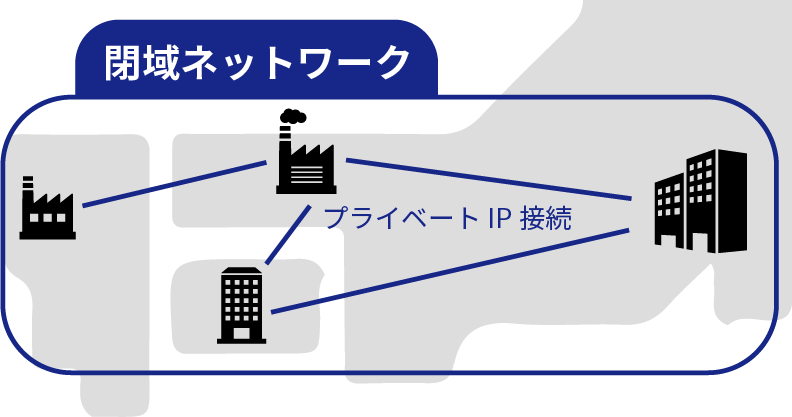
VPN stands for “virtual private network.” It works like a dedicated line, so only specific people and devices can access it, and you can build a secure network. However, as the word “virtual” suggests, it is not a one-to-one connection that occupies the line completely, like a leased line. It builds a “virtual” dedicated line. “Virtual” means that the transmission path (the data line) is shared with other users, but the protocol makes the network behave in software as if it were a private network.
VPNs are often used to connect a company’s sites, for example to access company servers and the files stored on them. The usual approach is to build a private network with private IP addresses that spans multiple sites.
The following article also explains global and private IP addresses.
Types of VPNs
VPNs are classified by the network they use, the protocol, the layer they target, and so on. This article covers two classifications: 1. the type of network and 2. the type of protocol.
1. Types of networks
The type of VPN depends on the network it uses, such as an open network or a closed network. This article covers the following three.
- Internet VPN
- IP-VPN
- Wide area Ethernet
2. Types of protocols
VPNs can also be classified by how they are built: which protocol they use, and which layer they secure. The protocol depends on which of the networks above the VPN uses. Typical protocols are shown below.
| Network type | Protocol type |
|---|---|
| IP-VPN | MPLS |
| Wide area Ethernet | VLAN |
| Internet VPN | IPsec-VPN, SSL-VPN, L2TP/IPsec, PPTP |
The protocols used for internet VPNs are explained in detail in the following article.
Protocols used for internet VPNs (Japanese)
Types of networks used for VPNs
Now let’s look at the types of networks used for VPNs. When you build a VPN, the network falls into one of two broad groups: an open network or a closed private network. An internet VPN uses an open network. IP-VPN and wide area Ethernet use closed networks.
- Closed networks: IP-VPN, wide area Ethernet, and others
- Open networks: Internet VPN
How an IP-VPN is structured
Carriers run high-capacity lines dedicated to IP-VPN across Japan. This is called the backbone network. To use an IP-VPN, you subscribe to a carrier’s IP-VPN service and use this backbone. A dedicated line called the access network then runs from the point on the backbone closest to each of your offices. The access network is a dedicated line, such as optical fiber or ADSL, that connects the local carrier’s facility to the customer’s site. An IP-VPN connection therefore uses two kinds of lines: the backbone network and the access network.
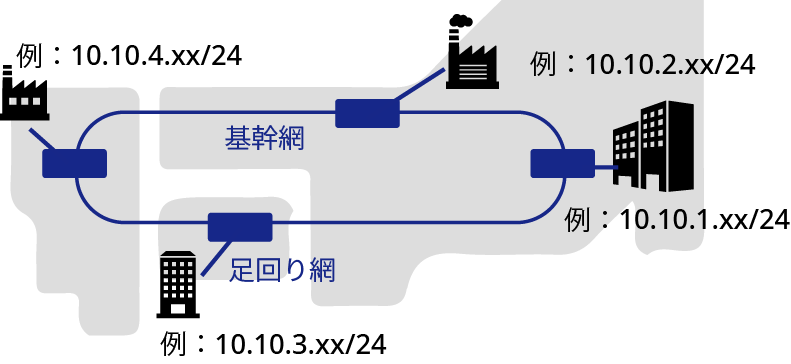
The router installed at the boundary between the backbone and the access network is called a PE router. The router at the end of the access network inside each company, if managed by the carrier, is called a CE router.

MPLS, the basis of IP-VPN
Here is a short explanation of MPLS, which is essential for building an IP-VPN. As explained above, each carrier runs a backbone network. This backbone is shared by all the companies that use the carrier’s IP-VPN service.
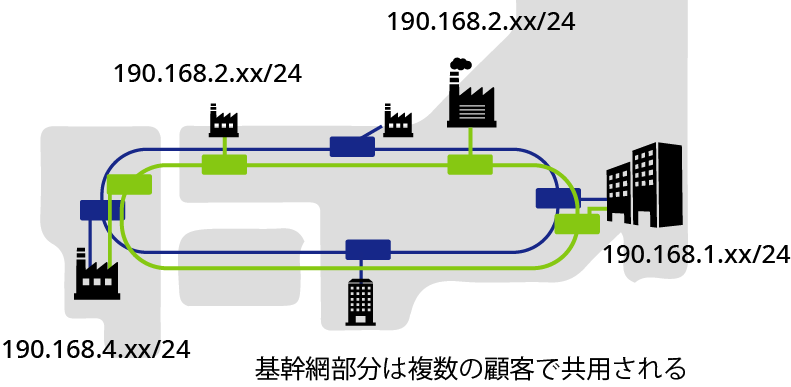
Because of this, several companies may use the same IP addresses, and for security reasons IP addresses cannot be used for routing inside the backbone. MPLS is the header used instead of IP addresses. The packet, including its IP header, is given an MPLS header.
When the data reaches each site based on the MPLS information, the MPLS header is removed and the IP address becomes visible again. Inside each site, data is delivered based on the IP address.
BGP for redundancy
If an IP-VPN had only one access line and one backbone route, a single break would cause problems, so redundant routes are always provided. With these redundant lines, however, the network becomes very complex. A protocol for dynamic routing, including switching during failures, is therefore used. This protocol is BGP (Border Gateway Protocol), and it keeps the lines redundant.
Wide area Ethernet
Wide area Ethernet, also called an L2 network, was the main option before IP-VPN became widespread. Like IP-VPN, it is a service that provides a closed network for a specific company on a carrier’s fixed network. The difference is that IP-VPN assigns IP addresses to each company, while wide area Ethernet uses Ethernet as the interface instead of IP addresses. Wide area Ethernet offers more design freedom than IP-VPN, but design takes more work, so it is used less often today.
VLAN, the basis of wide area Ethernet
To build a wide area private IP network like an IP-VPN with wide area Ethernet, the user must implement the IP network themselves. VLAN is the protocol most often used for this. Like MPLS, VLAN carries packets with IP addresses without using the IP addresses. Unlike MPLS, VLAN has a wider range of uses. For example, VLAN is also used to connect IP-VPNs run by different carriers, such as an IP-VPN in Japan and one outside Japan.
Internet VPN
An internet VPN uses existing internet connections to build a VPN on an open network. It is a relatively convenient way to connect and is often used for remote work. Fixed costs are also lower than for IP-VPN or wide area Ethernet. On the other hand, communication speed depends on the network environment where each device is used. Because it uses an open network, you must always keep in mind that third parties can see the traffic, so encryption is essential. Encryption differs by protocol, as described below, so it is important to choose a protocol suited to your application.
How an internet VPN is structured
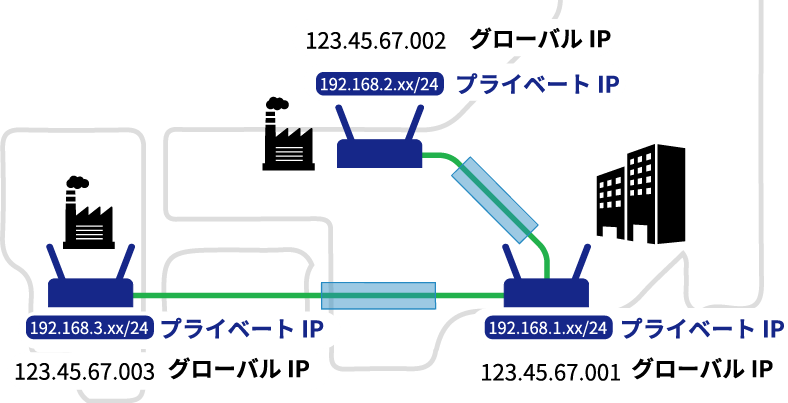
First, each site gets a static global IP address to connect to the internet. Using these global IP addresses, a virtual dedicated tunnel is built between the sites to carry data, which creates a private network. A private IP address space is formed under each site, and devices can communicate with each other over private IP addresses.
Protocols used for internet VPNs
IPsec is the best-known protocol for internet VPNs, but many others are used too, such as SSL and L2TP.
| IPsec-VPN | Highly secure and widely used, but expensive and sometimes does not work well with firewalls. |
|---|---|
| SSL-VPN | Less secure than IPsec, but good for remote access, convenient, and low-cost to operate. |
| L2TP/IPsec | L2TP alone is not secure, so it is combined with IPsec. Supports many protocols and can handle multiple user sessions. |
For details on the protocols used for internet VPNs, see the following article.
Protocols used for internet VPNs (Japanese)
Connecting mobile devices to a private network
So far, we have described VPN connections over fixed lines such as optical fiber. This section explains how to connect mobile devices to a private network.
Connecting mobile devices to an IP-VPN
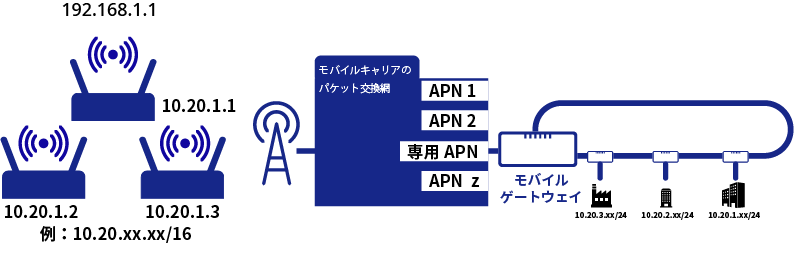
First, a dedicated point called a mobile gateway is set up on the IP-VPN side to receive mobile traffic. Next, a dedicated APN is created for the IP-VPN network, and the range of IP addresses assigned to the mobile devices is defined. When each device then connects to the dedicated APN, it receives an IP address from that range and can communicate within the private IP network. From the point of view of the whole IP-VPN, it is like adding one more “site” dedicated to mobile devices.
Connecting mobile devices to an internet VPN
As with an IP-VPN, you set up an APN dedicated to one company and define the range of IP addresses assigned to the mobile devices. The dedicated APN connects to a dedicated router, operated by the mobile carrier, that links to the VPN. A VPN path is set up between this router and the router at the company’s site. You then configure rules such as “when a connection starts on this APN, assign this IP address.” Communication between private IP addresses then starts automatically.

amnimo LTE devices with VPN support
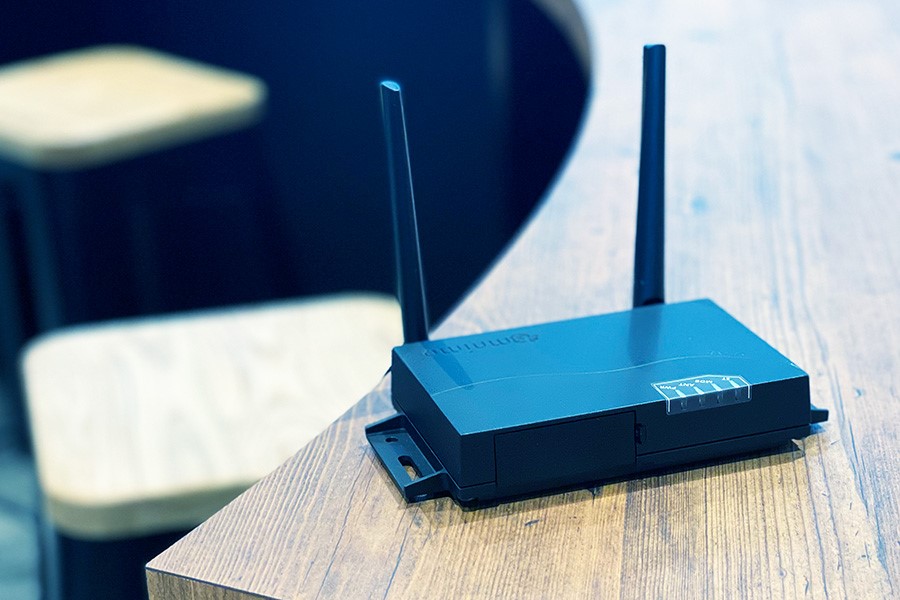
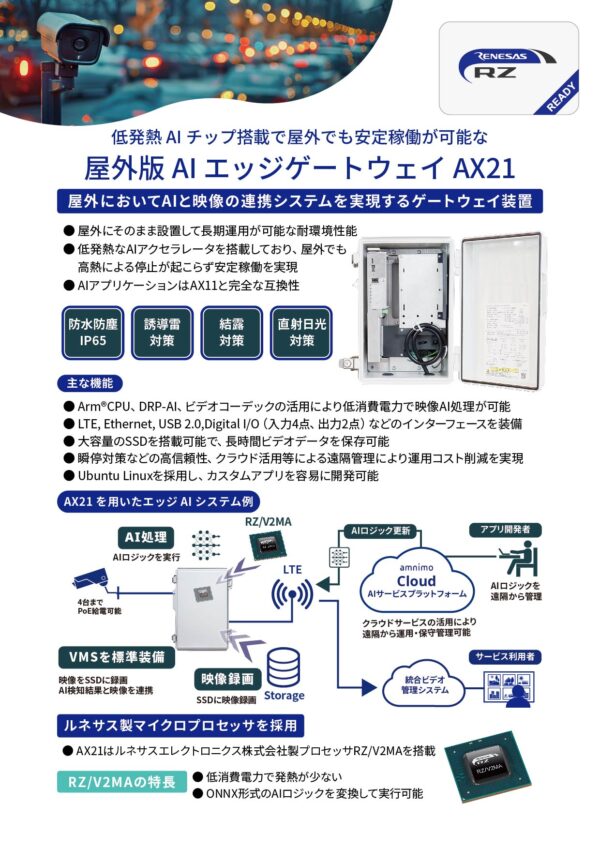
All amnimo LTE devices, such as our gateways and routers (except the portable cameras), support IPsec, a secure internet VPN protocol. amnimo devices have been connected over IPsec to Cisco and Yamaha routers. These LTE devices also offer dual firmware, multiple SIM cards, and protection against momentary power interruptions, so they are well suited to building VPNs that need high stability. If you are planning a VPN with IPsec, consider amnimo LTE devices.
You can download the general catalog, which covers all amnimo LTE devices, below.

Contact usProduct inquiries and documents
We can help you choose products and put together a package for your application. Consultations are free.